Inspark A11y Assistant
A Chrome extension and FastAPI microservice I built to test WCAG scanning workflows on Inspark course pages, with issue highlighting and HTML/PDF report export.
“Raw accessibility scan output is useful, but it is also noisy. I wanted a workflow that made it easier to scan a course page, see the issue in context, and hand someone a report they could act on.”
The point was to catch obvious accessibility issues while a course is still being built, not after someone runs into the problem. The prototype gives QA/content reviewers a repeatable flow: scan a page, inspect the issue, highlight it in context, and export a report.
axe-core can find violations, but the raw output is hard to use if you are reviewing lesson content. I wanted to wrap the scan in a course-review workflow: scan one screen, move through the lesson, group repeated issues, and attach fix suggestions that are close to the actual content.
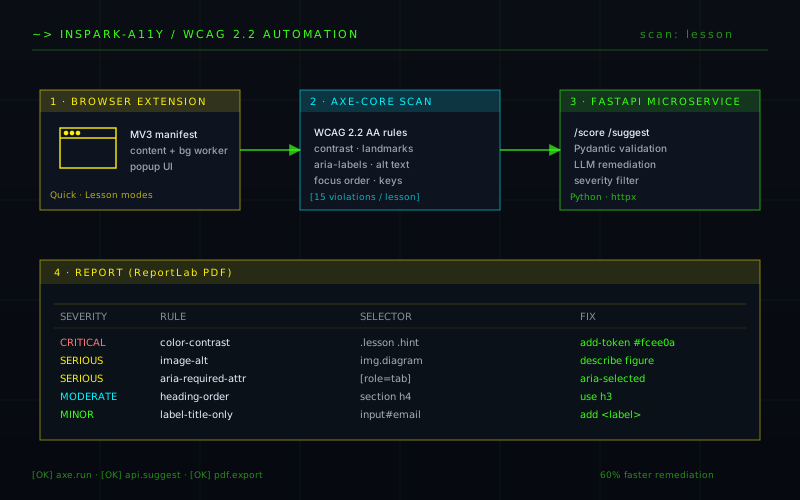
I paired a Chrome MV3 extension with a FastAPI microservice. The extension injects axe-core, runs page scans, tracks lesson-screen navigation, and lets reviewers hover a violation to highlight its location. The backend returns remediation suggestions and supports report generation so findings can leave the browser as HTML or PDF.
- 01Chrome MV3 extension — content script for axe-core injection and page monitoring, background service worker for scan orchestration, and popup UI for results.
- 02FastAPI microservice — Pydantic-validated REST API with suggestion logic and report-generation routes.
- 03Lesson-traversal engine — service worker coordinates navigation across multiple lesson screens, aggregating findings into a single report.
- 04Reporting — HTML and PDF export with persistent local scan history.
Cross-origin lesson navigation
Lesson screens do not all behave like one normal webpage. Some screens navigate, some update in place, and some content lives inside iframes. I used the service worker to keep scan state across transitions, but this is still the most fragile part of the prototype.
Signal vs. noise in axe-core
The first scan output was too noisy to hand to a course author. I added grouping and severity filtering so repeated violations did not flood the report, but I would still want real reviewer feedback before tuning those defaults.
Suggestion quality
Generic advice like 'add alt text' is not very helpful. The hard part is making suggestions specific enough to be useful without pretending the tool understands the whole course. The current version is a starting point, not a replacement for human accessibility review.
- →End-to-end working extension + microservice.
- →Quick scan and lesson-traversal modes work in the prototype.
- →HTML/PDF report export works for sharing findings from a scan session.
- ·This is not ready to run across an entire course catalog. Lesson traversal still needs more testing across page types and iframes.
- ·Before broader use, I would add Playwright tests, PII masking in reports, and authentication/SSO.
- ·I would also validate the remediation suggestions with actual reviewers instead of assuming the wording is useful.