AI Accessibility Extension
Grant-funded ASU ETX accessibility research project. Built a Chrome MV3 extension and AWS-backed service that lets blind and low-vision students control STEM simulations with voice.
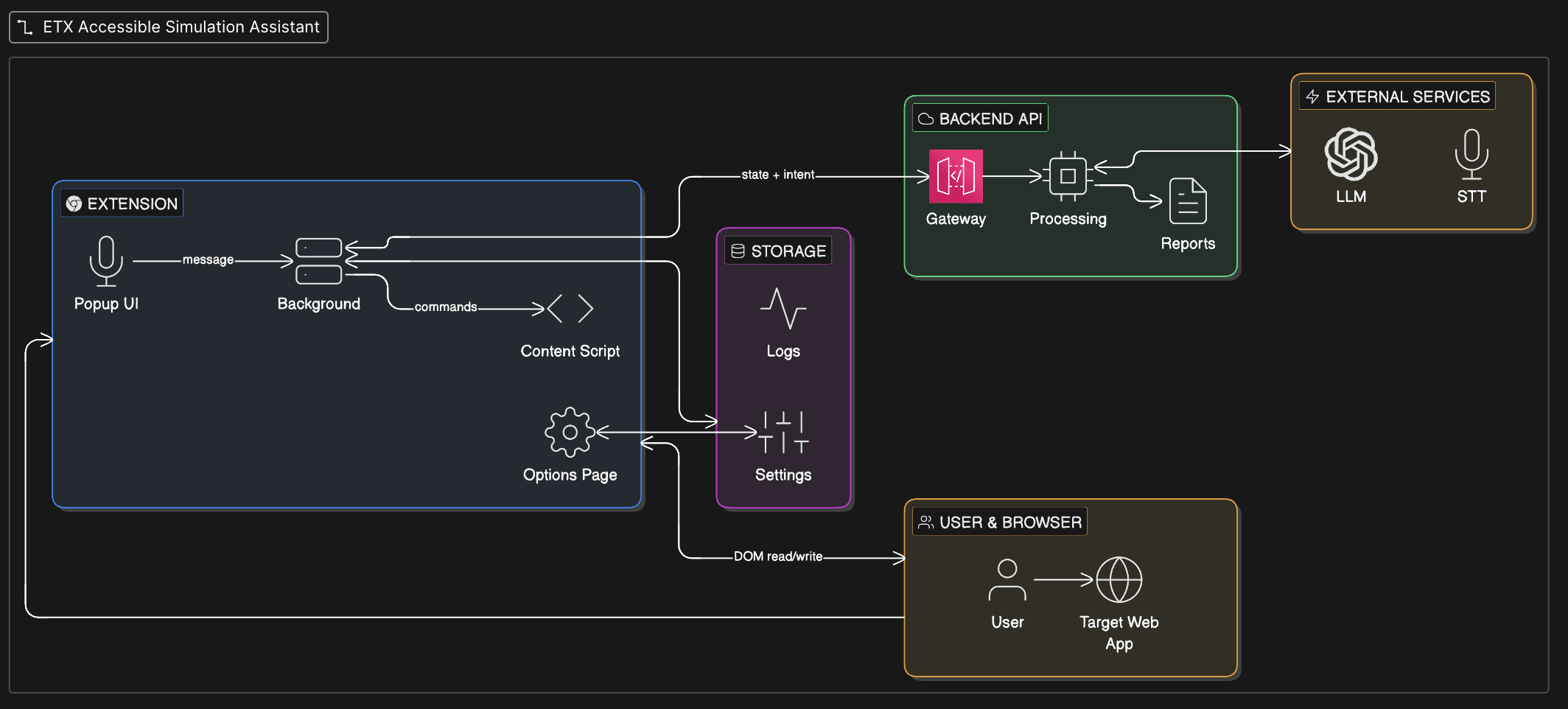
“A lot of STEM simulations teach through moving graphs, sliders, and visual state changes. If that state never reaches a screen reader, the lab becomes much harder to do independently.”
The goal is to avoid rebuilding accessibility support from scratch for every simulation. If the adapter/profile approach works, ETX can support another sim by writing a detector and profile for that sim instead of redesigning the whole voice-and-narration workflow.
ETX runs interactive STEM simulations across SimCAPI-based HTML/JS sims and Unity WebGL sims. For many of them, a screen reader does not expose the changing graph, animation, or simulation state in a way that lets a blind or low-vision student follow the lab independently. I needed a browser-based approach that could observe sim state, explain what changed, and eventually turn a voice command into a safe sim action.
I am building the extension and backend with close technical guidance from Kevin Segovia, who helps me think through architecture, feasibility, and the weird parts of simulation integration. Mia Brunkhorst helps keep the work grounded in Argos/Torus, QA, and real course-delivery needs. The mini-grant research runs under Chris Mead's faculty guidance, so I am also trying to build this in a way that can be evaluated instead of just demoed.
Kevin Segovia
Technical Lead & Advisor
Guides the high-level and technical decisions, especially around architecture tradeoffs and how to integrate with ETX simulations without making the extension brittle.
Mia Brunkhorst
Product Manager, ETX
Keeps the project connected to the Torus/Argos platform context, QA workflow, simulation needs, and the practical constraints of course delivery.
Chris Mead
Faculty Research Lead
Leads the research context for the mini-grant, with a focus on digital teaching and learning, active learning, adaptive learning, and inclusive excellence.
- 01Chrome MV3 extension — TypeScript content scripts watch for SimCAPI events, DOM changes, and sim-specific state that can be turned into narration.
- 02AWS Lambda backend — TypeScript endpoint that receives sim state and a user command, calls the LLM, and returns either narration or a structured action plan.
- 03Simulation profiles — each supported sim gets a profile that describes what state matters, what actions are allowed, and what context the assistant needs.
- 04Terraform setup — used so the AWS pieces can be recreated without clicking through the console each time.
- 05Accessibility output — Web Speech API and ARIA live regions for narration, with the current work focused on not interrupting the user's screen reader flow.
Two simulation engines, one schema
The SimCAPI sims expose useful state through JavaScript events, while Unity/WebGL sims are much less transparent. I am handling that by writing sim-specific adapters that emit a normalized event shape, but the Unity side is still the harder part because not everything is exposed cleanly.
Iframe sandboxes
The first idea was to read sim state directly from the parent page, but that breaks down when the sim lives inside an iframe. I moved toward content scripts inside the sim frame and `postMessage` back to the extension. The tradeoff is that every sim needs more careful permission and failure handling.
Latency vs. depth
Vision-based calls are useful when the structured state is missing something, but they are slower and more expensive. The current direction is to prefer structured sim state first and only fall back to heavier interpretation when the adapter cannot explain what changed.
Screen-reader cooperation
I cannot just dump narration into the page whenever state changes. If the extension talks over the screen reader, it becomes annoying fast. I am using ARIA live regions and queueing rules, but this still needs user testing before I would call it solved.
- →Current prototype is being built around 7 simulation profiles across SimCAPI and Unity/WebGL-style sims.
- →The core loop is working in prototype form: observe sim state, generate narration, and map selected voice commands into structured actions.
- →This is the current technical prototype for the ETX accessibility mini-grant work.
- ·This still needs telemetry before it can be evaluated seriously: latency, failed commands, confusing intents, and cases where narration is too noisy.
- ·I need automated tests across the simulation profiles because manual testing every sim after each extension change does not scale.
- ·The biggest open question is how well the adapter pattern holds up when a simulation hides important state inside canvas/WebGL.